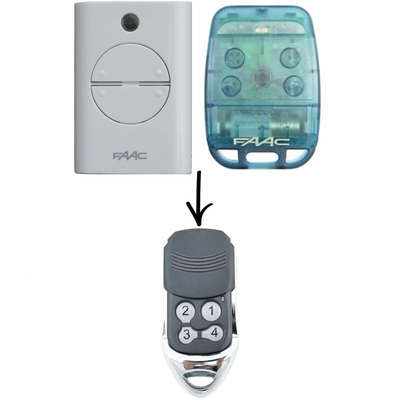

How to Program a FAAC XT2 / XT4 / TE4433H Compatible Gate Remote
Programming a compatible FAAC XT2 / XT4 / TE4433H remote depends on your board: E024S, E721, a standard learn button, or copying from an original master remote. All four methods are covered.
- The new compatible remote with its battery fitted
- Access to the FAAC control board (cover removed) or your original master remote
- Screwdriver for the motor cover
FAAC gate and garage systems come with several different control boards, and each learns a remote slightly differently. Identify your board first, then follow only the step that applies to it.
Applies to
Compatible replacement remotes for the FAAC XT2, XT4, TE4433H, 787452, 433 LC, RC, 740, 741 and 402 handsets used with FAAC gate and garage motors.
Before you start
Switch the power off before removing any cover, then switch it back on to program. If you are copying from an original remote you must be within 1 to 2 metres of the motor.
Independent programming guide for compatible replacement remotes. Brand and model names belong to their respective owners.
Step-by-step instructions
Identify your FAAC board
FAAC systems vary. Use the step that matches yours: an E024S board (steps 2), programming from an original master remote (step 3), an E721 motor with SLH remote (step 4), or a standard FAAC control board with a learn button (step 5).
E024S board
Press and hold the + (LOGIC) button. While holding it, momentarily press SETUP, then let go of everything. Within 5 seconds, press the button you want to program on the new remote for 2 seconds.
From an original master remote
Stand 1 to 2 metres from the motor. Press buttons 1 and 2 on the original remote together for 2 seconds, then press button 1 on the original for 2 seconds, then press button 1 on the new remote for 2 seconds. Wait 10 seconds for the motor to exit programming.
E721 motor with SLH remote
Press buttons 1 and 2 on the remote together and release when the LED flashes. Press the remote button you want to program; the light stays solid. While still holding it, press + on the motor, then press SETUP immediately until the Radio 1 LED lights and turns off.
Standard FAAC control board
Remove the motor cover and find the remote programming (learn) button. Press it once; a red light comes on for 10 seconds. Within that time, press and hold the chosen button on the new remote for 2 seconds. The receiver light flickers when the remote is learnt.
Test
Press the programmed button. The gate or door should move. Refit any covers you removed.